Diamonds on a Budget
After a 15 year diversion pursuing other creative avenues,
mainly a first love of music, I drifted back into filmmaking
almost by accident. I bought a little Panasonic HDC-SD10 on a
whim because it was very cheap at just over £200 and it was very
small and lightweight. I intended to produce a number of music
videos and I needed something I could ‘throw around,’ but
unfortunately the music videos never happened and the camcorder
began gathering dust, particularly sawdust!
I had already designed and built the clock that appears in Thinking
Time and it was on long term test awaiting
finishing and staining when it dawned on me that it might make
an interesting subject for a documentary. Finishing the clock
required dismantling it down to its component parts, and this
gave me the opportunity to formulate a drama-style storyboard,
which included a beginning, middle and end. I also added an
element of doubt - can he do it/will it work? – or else the
documentary might simply have ended up being a ‘how to’
tutorial.
However, I had a problem! I was aware that a fair proportion of
potential viewers would be interested in the mechanical aspects
of the clock’s construction, but what about those that weren’t?
How to hold the attention of viewers who had no interest in
pillar drills or scroll saws was achieved (I hope) by not
actually revealing what I was building until towards the end. I
also decided to add a brief ‘can you guess what it is?’ caption
on a couple of occasions, but more on this later…
Because the clock’s components had already been made, I had to
refabricate a couple of parts purely for use in the documentary.
All the processes I went through – designing, printing, cutting
out, drilling and finishing - were identical to those I had used
on the clock.
When it came to shooting the footage I used a tripod throughout
and manually focused almost everything apart from a small number
of clips that worked better with auto focus - for example if I
walked towards or held something up to camera. I also used
manual exposure for the majority of shots because the low height
lighting in my workshop was sometimes obscured by my head as I
moved around.
  Some of the shots were a little tricky to set
up. The ‘flash of inspiration’ desk light illuminating in the
opening section was achieved simply by pushing a part-inserted
13A plug into a plugboard with my foot, thereby getting the
timing spot on! The ‘quick change’ into layers of protective
clothing was a simple jump cut – easily done when the camera is
mounted on a tripod. A shot that is often talked about is the
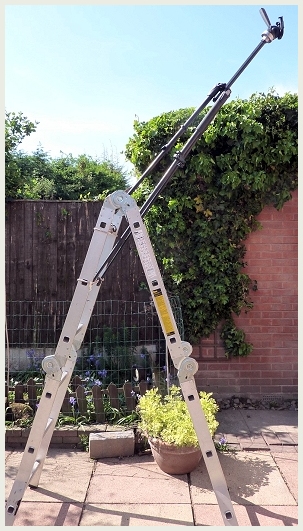
overhead of me entering the workshop – this was achieved
‘simply’ by laying the tripod horizontally on the workshop roof
with the low weight SD10 camcorder overhanging the edge. Luckily
the tilting monitor screen allowed me to get the correct framing
from my position, but as I wasn’t prepared to dangle over the
edge of a fourteen foot high roof pressing buttons on the
camcorder, the footage was recorded using auto-everything! I set
the camcorder running then scrambled down the ladder and ran
through the house to appear calmly and serenely entering the
workshop, before running back again and scrambling up the ladder
to retrieve the camcorder before somebody pinched it! Some of the shots were a little tricky to set
up. The ‘flash of inspiration’ desk light illuminating in the
opening section was achieved simply by pushing a part-inserted
13A plug into a plugboard with my foot, thereby getting the
timing spot on! The ‘quick change’ into layers of protective
clothing was a simple jump cut – easily done when the camera is
mounted on a tripod. A shot that is often talked about is the
overhead of me entering the workshop – this was achieved
‘simply’ by laying the tripod horizontally on the workshop roof
with the low weight SD10 camcorder overhanging the edge. Luckily
the tilting monitor screen allowed me to get the correct framing
from my position, but as I wasn’t prepared to dangle over the
edge of a fourteen foot high roof pressing buttons on the
camcorder, the footage was recorded using auto-everything! I set
the camcorder running then scrambled down the ladder and ran
through the house to appear calmly and serenely entering the
workshop, before running back again and scrambling up the ladder
to retrieve the camcorder before somebody pinched it!
Artistic Licence works wonders
When the clock was finally revealed I had to do something to
make it more dramatic! It is actually quite a sedate mechanism
and moves slowly for only a couple of seconds once a minute – a
pace which proved far too slow in the edit. I resorted to partly
dismantling the clock once again and connected a slow running
electric motor directly to the arbor of the minute hand in order
to rotate the mechanism continuously. All the close-ups showing
the clock seemingly ‘ticking away’ and the various levers
moving, are in effect happening sixty times quicker than they do
in real life. A little bit of artistic licence works wonders!
Once I had shot all the footage my attention turned to editing.
Another problem! My computer was aged – a Fujitsu Siemens of
some 7 years vintage, running Windows XP with a meagre 2Gb RAM
and a single core processor. Research revealed that Sony’s Movie
Studio Platinum series (then version 10) was able to run on such
an antiquated system, yet import the required high definition
AVCHD files and edit and render them in Full HD. I decided that
for around £20 it was worth a try, and it was money well spent
because the program was a revelation! OK, a slow revelation on
my vintage computer but to suddenly be able to work on an entire
project in Full HD was something I’d never have thought
possible, and I’ve stuck with the program series ever since.
Editing however started to reveal some of the shortcomings of
the budget camcorder – not least the lack of the facility to
connect an external microphone. All the live sound was recorded
using the camcorder’s built in microphone, and this included
sounds of occasional passing cars as well as particularly
troublesome bird song. Luckily I found Sony’s editor to be very
intuitive in its handling of the audio streams and I used a
number of the stock ‘plug-ins’ to improve the soundtrack –
particularly equalisation to reduce traffic rumble and a noise
gate, which cuts off sound below a certain level, to eliminate
the bird song in between talking to camera.
Unfortunately using the noise gate resulted in a totally quiet
and unnatural soundtrack between speaking, so I simply added the
sound of a suspiciously noisy dust extractor fan to the timeline
during the workshop footage. This helped mask the effect of the
noise gate. If you listen hard you might hear a few bird tweets
when I am talking, but only now I’ve mentioned that they’re
there! A couple of clips unfortunately defeated all my efforts
to silence the birds and I had to re-shoot them – the clips, not
the birds!
The last time I edited anything was using S-VHS tape, so to
suddenly have the freedom of computer-based editing I found
immensely enjoyable, and it allowed me to create the illusion
that the clock and its parts were being worked on. In fact,
every time I am looking at, pointing at, adjusting or
constructing something just out of frame - it simply isn’t
there! The software also allowed me to turn a single camera
shoot into something that resembled a multi camera one. For
example, the five shots between me leaving the house and turning
to camera in the workshop were each set up individually and
filmed over the course of an hour or so, then compiled on the
timeline and dragged and trimmed frame by frame so that the flow
of action was realistic.
Once the visual editing was complete, I wrote and recorded a
number of musical themes to fit in with the various sequences
and recorded a pre-prepared commentary using the camcorder’s
microphone. I imported and mixed these on the editor’s timeline
along with the live camcorder sound and a host of assorted sound
effects, including an owl hoot, bells, a horror laugh and some
appropriate snoring!  Traditional titling, intertitles and end credits
rounded the documentary off. Over the course of some months,
editing was tightened and small adjustments made, following
comments made by judges in local and regional competitions. Traditional titling, intertitles and end credits
rounded the documentary off. Over the course of some months,
editing was tightened and small adjustments made, following
comments made by judges in local and regional competitions.
The only criticism I refused to accede to was the removal of
the supposedly superfluous ‘can you guess what it is?’ caption,
because it had exactly the effect I wanted, and luckily the
BIAFF judges agreed. I used to enjoy sitting at the back of
screenings and watching the reaction of the audience when the
captions appeared – the room would be split in two: one half
holding hushed discussions with their neighbours about what they
thought it was, the other half (knowing what it was because they
had already seen the documentary) doing exactly what I was doing
– looking around, smiling and remaining smugly silent. Audience
interaction: perfect!
- John Roberts
Watch
the film here:
|